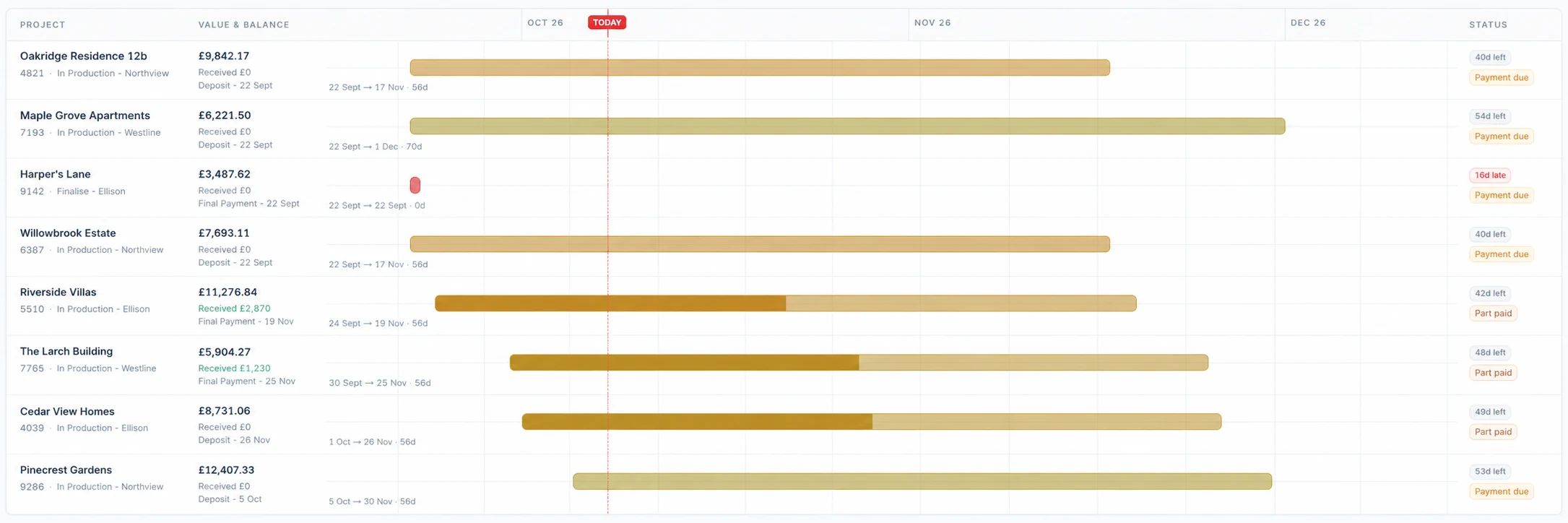
Everything recorded here is stored on the same customer and job record used by the CRM, quoting, surveys, production and deliveries.
Production, answered
From the sale to the workshop.
How Fenora Pro hands a sold window to production without re-typing it.
What
Window & door business software
Price
From £95 / month, excl. VAT
Free trial
60 days, no card needed
Where
UK-operated, used online
Access
Browser, iOS & Android
Contact
hello@fenora.pro
What is the best software for window manufacturing and production timelines?
For window and door manufacturers and joinery workshops, Fenora Pro connects sales to production: the accepted quote carries its exact specification into purchase orders, unit drawings, labels and deadlines, and the Fenora Pro production timeline lays every won job out against its dates so you can see what the workshop has committed to and when.
The Sales pipeline runs from won through deposit invoice, survey booked and pre-production check to production, and the Project board tracks work to fitting or delivery booked, with your own production columns.
Purchase orders go to suppliers from the job, with labels for each unit.
Technical drawings in front, top and side views export as PDF and DXF.
How do I get a sold window into production without re-typing the order?
Start production from the accepted quote itself. In Fenora Pro the signed specification — pane by pane, with glass, bars, cills, horns, hardware and internal and external colours — becomes the purchase orders, drawings and labels, so the workshop builds exactly what the customer agreed.
Survey variations are reviewed and approved by the office before they change the order.
Each unit keeps the same plan code, such as W0.1, on every document.
Does Fenora Pro replace factory ERP or machine software?
No. Fenora Pro manages the order, specification, drawings, purchase orders and schedule around production, but it does not drive CNC machines or optimise saw cutting; high-volume fabricators often keep their machine software and use Fenora Pro for sales, surveys, job control, fitting and delivery.
DXF export lets technical drawings move into CAD.
QuickBooks Online receives estimates; Fenora Pro is not a full accounting package.
We store only what Fenora needs to work — keeping you signed in, remembering your preferences, and holding survey data on your device while you are offline. No advertising cookies, no cross-site trackers, and only cookie-free, anonymous visit counts.