The platform / CRM

A CRM built for window and door sales

Customers, opportunities, correspondence and follow-ups, connected to the work they belong to.

Discuss your workflow
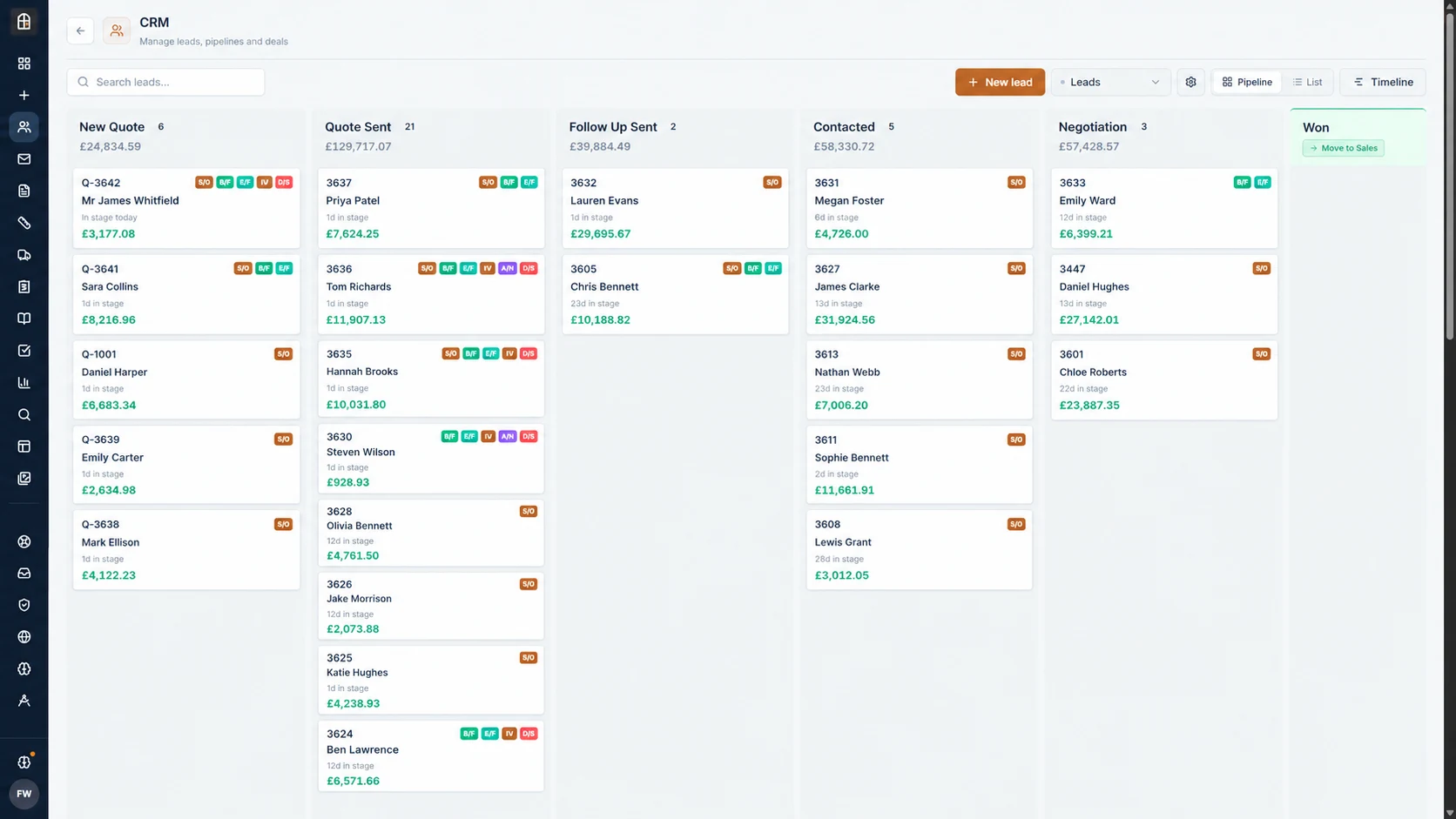
Fenora’s published CRM pipeline imagery.FENORA / PUBLISHED PRODUCT IMAGERY
Included in this module

What you can
do with it.

01

A pipeline shaped around the window trade

02

Customer, site and company records

03

Quotes, documents and notes on the same record

04

Tasks, ownership and follow-ups

Everything recorded here is stored on the same customer and job record used by the CRM, quoting, surveys, production and deliveries.

CRM, answered

A CRM for the window trade.

How the Fenora Pro CRM keeps the deal and the job on one record.

What
Window & door business software
Price
From £95 / month, excl. VAT
Free trial
60 days, no card needed
Where
UK-operated, used online
Access
Browser, iOS & Android
Contact
hello@fenora.pro

What is the best CRM for window and door companies?

Fenora Pro includes a CRM built for window and door companies: each customer record holds the site, quotes, surveys, documents, notes, tasks and email, and every deal moves through pipelines shaped around the trade, from new enquiry to won, production and fitting.

  • Leads pipeline: new quote, quote sent, follow-up sent, contacted, negotiation and won.
  • After the sale: deposit invoice sent, survey booked, pre-production check, production, and fitting or delivery booked.
  • Lost deals and archived jobs keep their full history, and an archived job can be marked for service.
  • Gmail and Google Workspace conversations are attached to the customer record.
  • Included in the £95-a-month core platform.
See connected email

Can Fenora Pro replace our existing CRM?

For window and door work, yes: Fenora Pro is built so that the deal and the job are the same record, with leads, stages, quotes, surveys, documents, notes, tasks and customer email kept together instead of in two systems that must be kept in step.

  • Accounts stay in your accounting software; accepted quotes can be pushed to QuickBooks Online as estimates.
  • Records are not imported from another system — new work starts in Fenora Pro and moves across job by job.
  • Quotes, leads and customer records can be exported.
See how getting started works
Choose your next step

See how it fits your business.

You do not need to make the same decision as everyone else.

Already using Fenora? Log in to your workspace ↗ Continue an unfinished setup ↗Looking for help? Visit support.

The rest of the platform

See the other modules.

Explore the whole platform

Cookies on Fenora

We store only what Fenora needs to work — keeping you signed in, remembering your preferences, and holding survey data on your device while you are offline. No advertising cookies, no cross-site trackers, and only cookie-free, anonymous visit counts.